

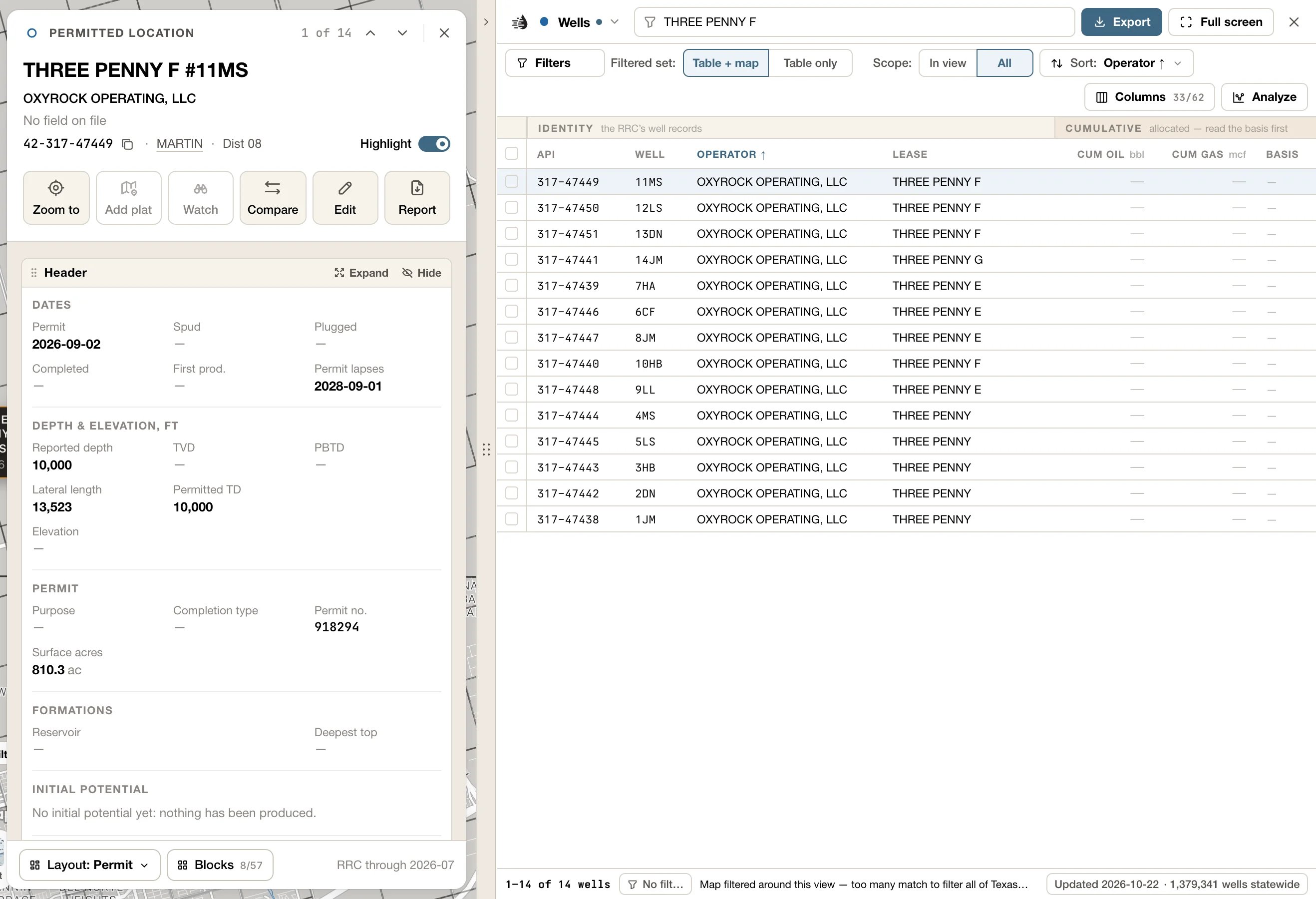
- The ↑ ↓ arrows at the top of the card step to the previous and next row. ↑ / ↓, or k / j, do the same. Beside them, the card shows where you are, such as 3 of 2,798.
- One card is open at a time. A card you open from it, such as a lease’s operator, goes on top, with the card you came from named above its name. Click that name, or press Esc, to go back. See One card at a time.
- The × at the top right closes the card, and so does Esc when there’s nothing to go back to.
- The card and the tables are separate. The Tables handle on the map’s edge shows and hides the tables and leaves the card open: with the tables hidden, the card floats over the map. Closing the card leaves the tables as they are.
Kinds of card
Every table has its own card. Every well gets the well card, which starts on one of three layouts, depending on the well:
Each kind keeps its own arrangement, so what you change on a permit stays with permits.
Leases, operators, fields, P-4 transfers, P-4 filings, frac jobs, pads and rigs each have a card of their own, made of blocks you can arrange. So do counties and selected areas, which have no table of their own: see Counties and Select an area.
A lease that stopped producing before 1993 opens with its Historic production, its Archive record and the Bores on record.
The Operators and Fields cards are described in Operators & Fields.
Follow a thread
Cards open other cards:- On a well card, the lease’s name in the title opens the lease, and so does a lease in the Leases block. The operator and the field under the title open their cards. In Rig & pad watch, a line opens the rig site’s or the new ground’s card.
- On a lease card, click the operator’s or the field’s name under the title. Click a well in Wells on lease, or an operator in Operator history.
- On a field card, click a lease under By lease to open that lease’s card. ↑ / ↓ then step through the field’s leases. Click an operator under Operators, or a county under Record, to open its card.
- On an operator card, click a lease under By lease, or a deal under Deals to open its P-4 filing.
- On a P-4 transfer card, the lease’s name under the title opens the lease. On a P-4 filing card, the buyer’s name, the title, opens the buyer, and the seller’s name under it opens the seller.
- On a frac job, pad or rig card, View well opens the well.
- On a well, lease, frac job, pad or rig card, the county on the id line opens the county’s card.
Layouts
A card is made of blocks, such as Totals, Production, Wellbore or Frac & stimulation. Layout, at the foot of the card, picks which blocks show and where. It reads the current layout, such as Layout: Overview.- Presets:
- Producing wells: Overview, Engineering, Production, Land & title and Acquisition.
- Permits: Permit, Engineering and Land & title.
- Injection wells: Injection, Compliance, Facility & field and Engineering.
- Leases: Overview, Production, Acquisition and Land & title.
- Frac: Overview, Design and Production.
- Every other card: Overview.
- Save layout as… keeps your arrangement under a name. You’ll find it under Saved, where you can also Rename… or delete it.
- Reset to preset · ‹name› undoes your changes.
Arrange blocks
- Drag a block’s header to move it. Drag its edge to resize it.
- Blocks, at the foot of the card, lists every block for this card and how many are showing, including ones hidden at first, such as Monthly volumes and Related leases on a lease, or Casing & cement and Survey stations on a well. Tick one to add it. A block the record has nothing for is greyed out, with the reason.
- Each block’s header has Expand, to fill the card, and Hide, to take the block off the card. Blocks with a choice of figures also have Fields, to choose and reorder them. Your choices are saved with the layout.
- Double-click a block’s header to expand it. Restore, or Esc, puts it back.
- A block’s own actions, such as Export CSV and Save PNG, are buttons at its foot. Fit to content joins them once you’ve resized a block that fits its content, and Reset view once you’ve changed what it shows.
The Production block
The Production block charts the record’s monthly oil, gas and water. Lease, operator, field and county cards have one, and so do selected areas. P-4 and frac cards chart their lease’s production. The well card has none.- Pick Monthly, Daily or Cumulative, and Log or Linear. On a narrow card, the two fold into one menu that reads your choice, such as Monthly · Log. When a block has more than one series, pick the series at the top.
- The Oil, Gas and Water chips, under the chart, turn each line on and off. An Estimate tag means the line is an allocated estimate.
- Chart options turns Events, Operator eras (shading for who operated when) and Unreported months on and off. All three are on at first.
- Drag the chart to move along it. Hold Ctrl as you scroll, or pinch, to zoom. While you’re zoomed in, the line under the chart sums up the months in view, and Whole life zooms back out.
- On a lease’s series, Forecast draws the valuation’s decline curve ahead of the history. Decline then lets you adjust it: pick Oil or Gas, and set the b-factor and Initial decline. Let go of a slider and the lease is re-valued; the button then reads Adjusted. Reset to auto goes back. Your adjustment lasts for this app session; a reload returns to the automatic fit.
- Export CSV and Save PNG, at the block’s foot, save the months or the chart. See Export data.
Decline workbench
On a lease card, Expand the Production block (or double-click its header) to open the decline workbench. It gives you a larger chart, decline parameters and a comparison against the automatic fit.- Across the top: Monthly, Daily or Cumulative; Log or Linear; History, Forecast or Full life; and Chart, By well or Table.
- Change the oil or gas curve, terminal decline or economic limit and check the preview. Apply to lease shares your adjustment with the lease’s valuation for this app session. Reset restores the automatic fit in the workbench. When there’s no live preview, the panel says so, and Apply to lease re-values the lease.
- Export has Production CSV, Forecast CSV · monthly, Forecast CSV · annual, Copy decline parameters, By well CSV · monthly (estimate) and Save PNG.
- Restore, or Esc, returns to the card.
By well
By well splits the lease’s production between its wells, one line per well.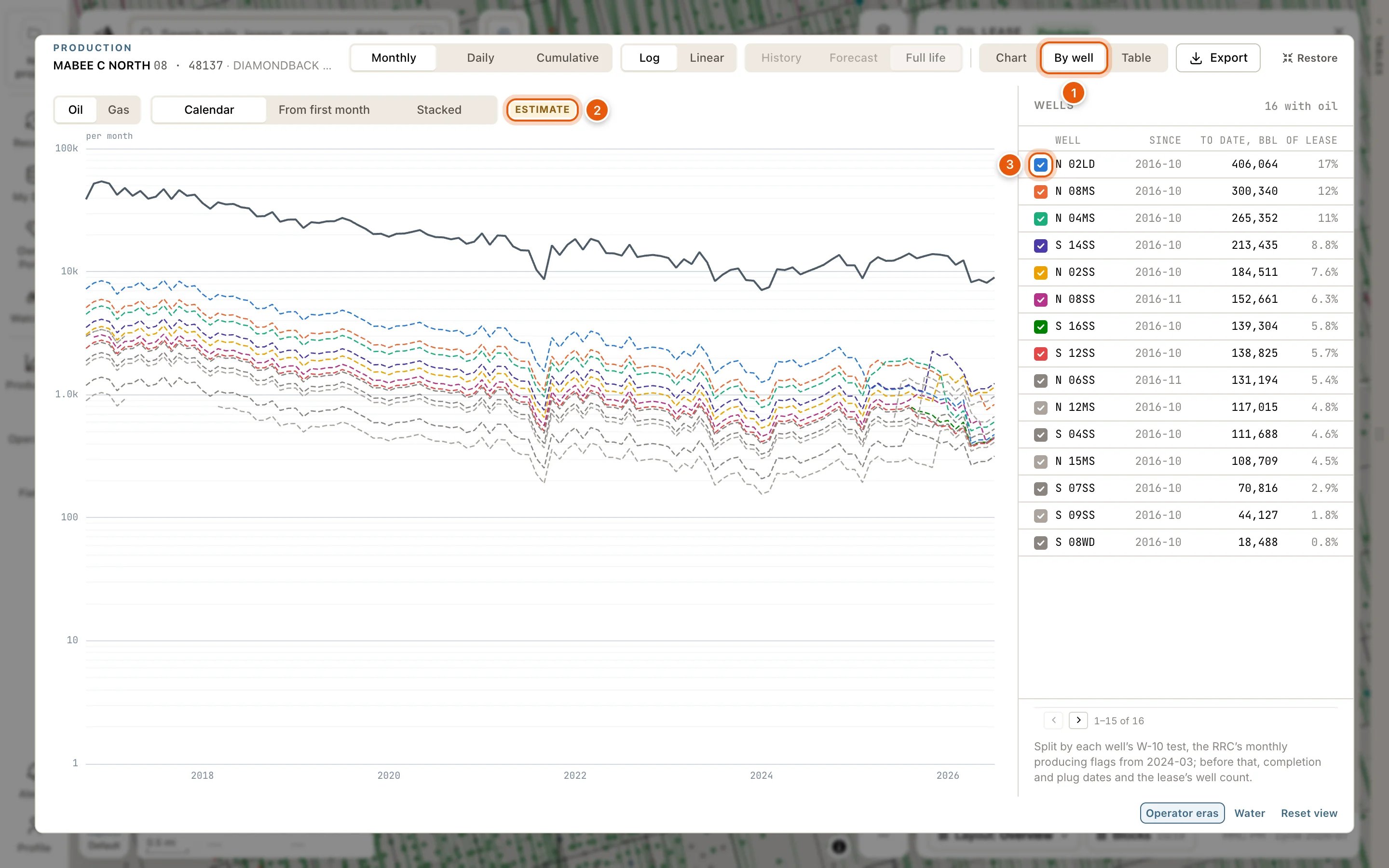
- Oil or Gas.
- Calendar lines the wells up by date. From first month starts every well at its first producing month. Stacked piles the wells into the lease’s total, on a linear scale, so they add up.
- Beside the chart, every well on the lease: when it started (Since), what it has made (To date) and its share of everything the lease has made (Of lease). Click a well’s colour to take it out of the chart, or its name to open its card.
- On a lease with more than 40 wells, the 40 biggest get a line of their own. The rest are listed, and when Stacked they share one band.
- Export → By well CSV · monthly (estimate) downloads every well’s estimated production, month by month.
Texas reports production by lease, not by well, so every figure under By well is an estimate, split from the lease’s total. The wells add up to the lease.
Card actions
The Copy icon beside each card’s id copies it: a well’s or a frac job’s API, a lease key, an operator, field or county number, a filing id, a pad’s detection id or a rig site’s id.
- Zoom to flies the map to the row.
- Plat on map lays a well’s W-1 plat over the map. See W-1 plats on the map.
- Edit corrects a well’s data, or adds your own. See My Wells.
- Report opens the printable well report in a new tab.
- Show on map draws the record on the map while its card is open. On an operator or a field card, it opens settings for what’s drawn; see Record cards.
- Add layer keeps an operator or a field on the map after its card closes, in the Operators or Fields layer. See Operator and field layers.
- Show leases and Show wells list the record’s leases or wells in a tab of their own, the Record tab. Show the whole filing does the same for every lease a P-4 filing moved. Your own tabs and their filters stay as they are.
- View well opens the frac job’s, the pad’s or the rig site’s well, on top of the card.
- Disclosure, on a frac card, opens the FracFocus disclosure in the drawer: every ingredient, its purpose and supplier.
- Full picture opens the site’s imagery, full size, in a new tab. For a pad, that’s the before and after.
- About, on a rig card, explains how to read a site.
Watch adds the record to your project’s watchlist, and Deal draft adds the lease to your deal draft. Both need a paid plan, and Watch needs an active project too. When one can’t be used it’s greyed out; point at it to see why.