

Create an account
1
Open the sign-up form
On the home page, click Get Started. On some pages the button reads Sign up instead.Inside Maps, open Profile at the bottom of the left rail and choose Create account.
2
Choose Sign up
If you land on the sign-in form, use the Sign up link under it. Create account in Maps opens the sign-in form, so you’ll need the link there.
3
Finish signing up
Follow the prompts to confirm your email. When you’re done, you’re signed in and on the map.
Sign in
Click Log in at the top of the home page, or open Profile → Sign in inside Maps. Signing in from the home page takes you to the map.Your account menu
In Maps, click Profile at the bottom of the left rail. The top of the menu shows your email, and under it, the plan you’re on.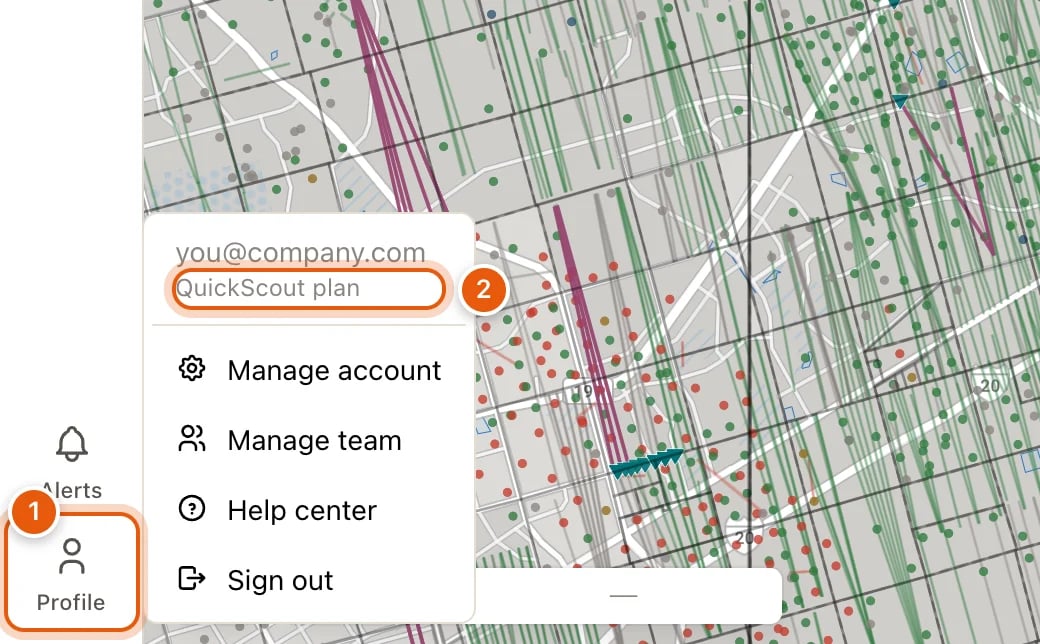
The rest of the menu:
When your access comes with your company’s account, the menu has no billing item: there’s nothing for you to manage.