

You need to be signed in. Rows in the data tables open their cards with a free account. Opening a record from the map or from search needs a paid plan, unless the data tables are open. Without one, you’ll see Subscription required and View plans.
Open a record
- Click it on the map. A well, permit or completion shows its popup first. Click View well in the popup: the popup closes and the well’s card opens. A production spike or a lease footprint opens the lease. An operator’s or field’s outline opens its card.
- From a well’s popup. Besides View well, the operator, lease and field names in the popup open their cards, and the county beside the API opens the county’s.
- From search. Every lease, well, field and operator in the search panel opens its card. See Search.
- From the data tables. Click a row. See Row cards.
- From Recents. Recents, on the left rail, lists the records you’ve looked at, and needs a paid plan. A card you stay on for a second or more is added to it.
With Settings → WELL POPUP set to On hover, a well’s popup shows as you point at the well, and clicking the well opens its card.
Where the card opens
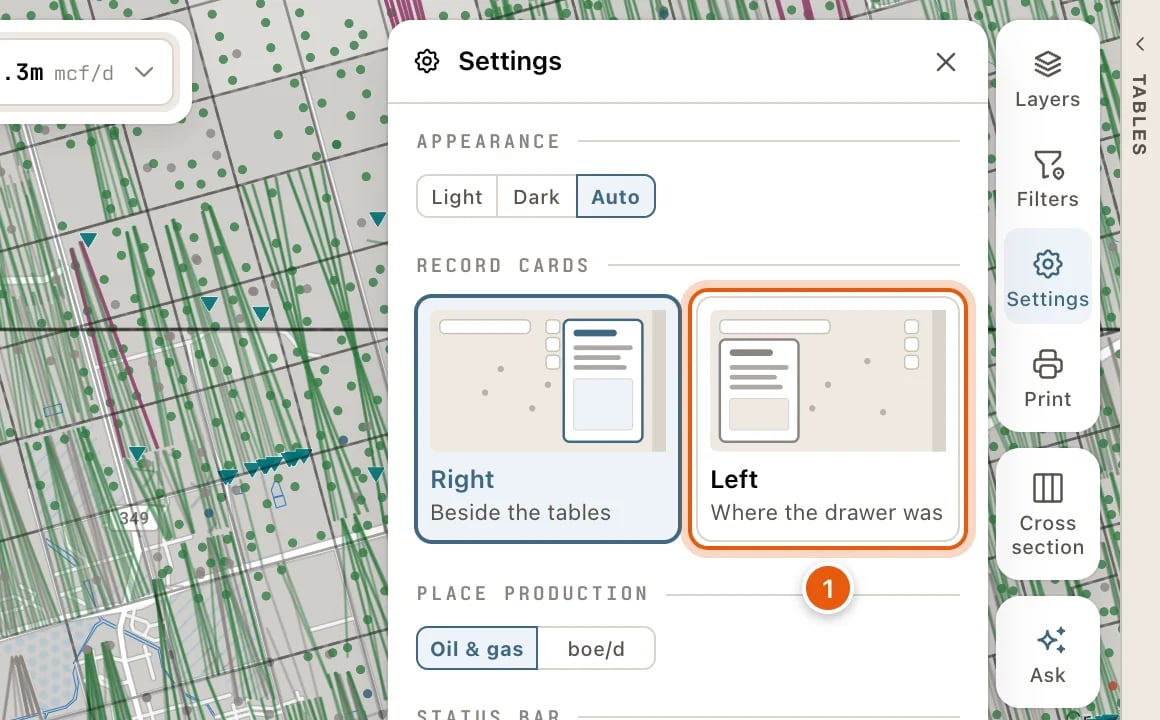
With the data tables open, the card stands against them. With the tables shut, it floats at the right of the map. Opening or shutting the tables leaves the card where it is, and clicking the map doesn’t close it. You can have cards open on the left instead, where records used to open:- Click Settings, the gear on the right side of the map.
- Under RECORD CARDS, pick Left (Where the drawer was). Right (Beside the tables) is where cards open at first.
What every card shows
Every card is laid out the same way, from the top:- The bar. What the record is, such as Oil well or Gas lease, and where it stands, such as Producing or Plugged. A card opened from the tables shows where you are in the table, with the ↑ ↓ arrows. The × closes the card.
- The name. On a well or a lease, the operator and the field each have a line under it. Click either to open its card.
- The id line. The record’s number, with a Copy icon beside it, then where it is. Click the county to open the county’s card.
- The buttons. Each shows its word. A few cards have a quieter row of buttons under them.
- The blocks. The body of the card.
- The foot. Layout and Blocks, which arrange the card (see Row cards), and how recent its data is.
One card at a time
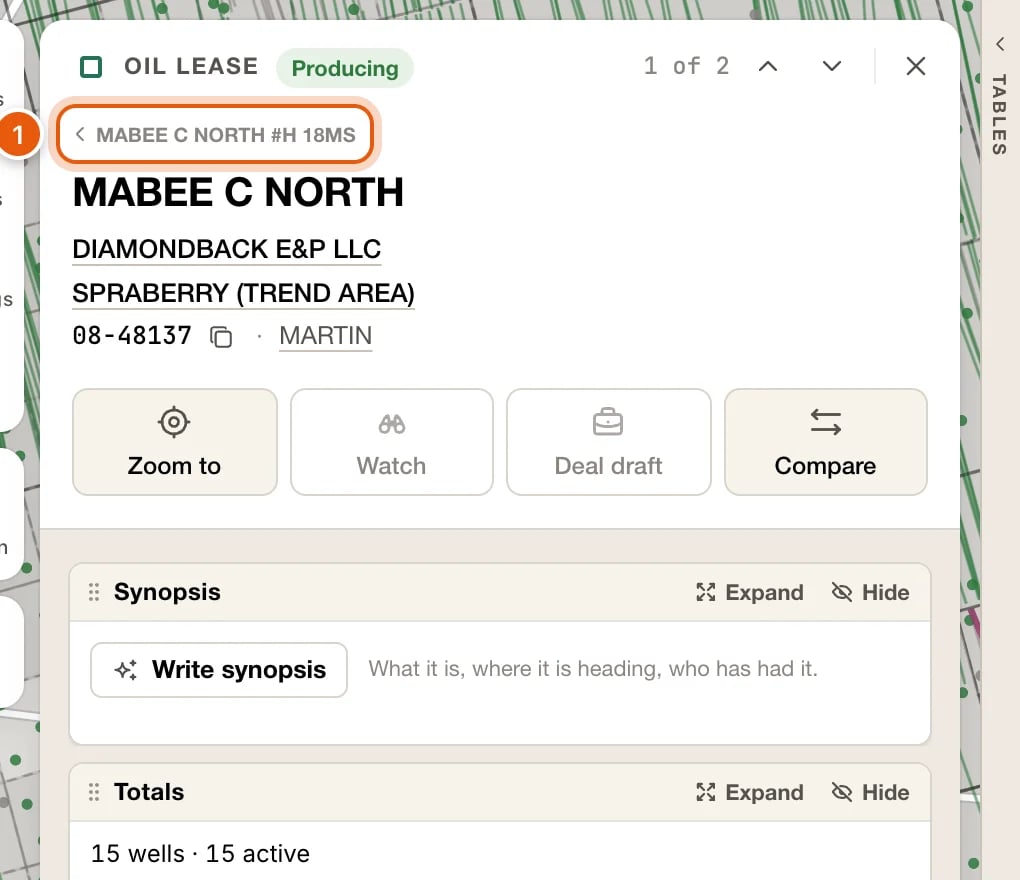
One card shows at a time.- Back. A card you open from another card goes on top of it: a lease from its well, say, or an operator from its lease. The card you came from is named above the new card’s name. Click it, or press Esc, to go back to it. Up to eight cards are kept this way.
- Close. The × at the top right closes the card. So does Esc when there’s nothing to go back to.
- Step. On a card opened from the data tables, the ↑ ↓ arrows at the top step to the previous and next row. ↑ / ↓, or k / j, do the same. Beside them, the card shows where you are, such as 3 of 2,798. A card opened from another card’s list steps through that list.
- Compare. c adds the card’s record to the compare tray, or takes it out.
While a record is read
Most cards fill in at once. When one takes longer, on a slow connection or while the map’s data is still downloading to this computer, the card shows the record’s name and grey placeholders where its contents will go. The line at the bottom says what it’s waiting for, for example Reading — the lease file is still downloading to this device · 42% · about 3 min left. If the record can’t be read, the card says why:
× or Esc closes the placeholder. To see what’s stored on this computer, see Map data on this device.
Synopsis
At the foot of a well, lease, operator or field card, under its other blocks, Write synopsis writes a few sentences about the record from what the RRC has on file: what it is, where its production is heading, and who has had it.- It takes a few seconds. The note under it says Written by AI from the RRC record through ‹month›.
- Every figure in it is checked against the RRC record first. When it can’t write one that keeps to the record, it says Couldn’t write one that keeps to the record.
- Writing a record’s first synopsis uses credits, like asking about the map. Once a record has one, showing it again is free.
- Write again writes a fresh one, and uses credits.
- When you’re out of credits, it says You’re out of credits for this month.
Wells
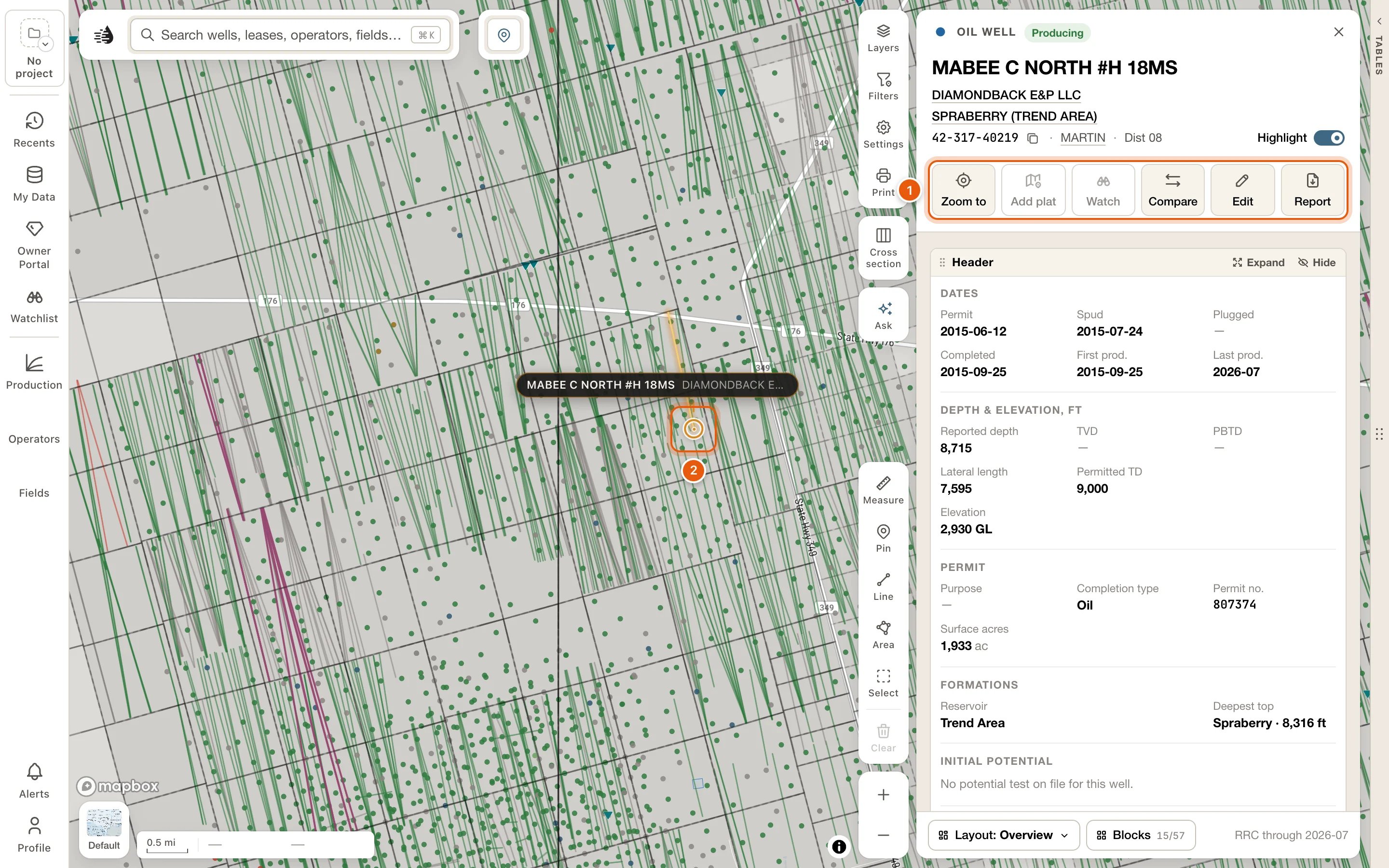
Every well opens the well card, made of blocks you can rearrange. A producing well starts on the Overview layout. A permit and an injection well start on layouts of their own; see Permits and injection wells. The card’s name is the well’s lease and its number. Click the lease’s name to open the lease’s card. The buttons under its name:- Zoom to flies the map to the well, with the whole bore in view.
- Plat on map lays the well’s W-1 plat over the map, and is pressed while the plat is there. With several plats on file, it reads Plats · N and lists them. With none, it reads Add plat and is greyed out. See W-1 plats on the map.
- Watch adds the well to your project’s watchlist, and is pressed while the well is on it. It needs a paid plan and an active project. When it can’t be used it’s greyed out; point at it to see why.
- Compare puts the well in the compare tray, and is pressed while it’s there. Click it again to take the well out.
- Edit corrects the well’s data, or adds your own. Your team sees your values. When some are yours, it shows how many: Edit · N. See My Wells.
- Report opens the printable well report in a new tab.
Blocks, at the foot of the card, adds more, such as Monthly volumes, Casing & cement, Survey stations, Mineral owners, Lease valuation & EUR and Rig & pad watch. The other layouts are Engineering, Production, Land & title and Acquisition. See Row cards. Your layout is remembered for your account and project.
A gas well leads with its gas: its figures put gas first, and Latest test shows its G-10.
The well card has no production chart. The well’s own volumes are in Allocated totals, and month by month in Monthly volumes; Leases has its leases’ totals. For a chart, open the lease’s card.
The RRC reports oil by lease, so a well’s share of its lease’s oil is an estimate, split from well tests. The note under Allocated totals says how this well’s share was worked out.
Permits and injection wells
A well that is permitted or spudded but not yet producing starts on the Permit layout: the permit, its Progress, the Rig & pad watch, its documents, and the other wells at the same surface location. An injection or disposal well starts on the Injection layout: what has gone down the hole against what its permit allows, the injection permit, its integrity tests, any enforcement, and the wellbore. Their buttons are the same as a producing well’s. Each kind keeps its own arrangement, so what you change on a permit stays with permits. See Row cards. Rig & pad watch is what QuickScout’s satellite watches see on the well’s pad: a rig on site and since when, or new ground cleared beside it. Click a line to open that site’s card.Where the well is
While a well’s card is open, the well is marked in amber on the map at every zoom, with a pin naming it. A horizontal’s bore is traced in amber too. If the well is off screen, or behind the drawer, the tables or the card, a chip at the edge of the map points to it and says how far away it is. Click the pin or the chip to fly to the well. Highlight, on the card’s id line, turns this marking off, and on again, for every well card.Site
Site shows the well’s pad from above. Timelapse, on the picture, plays the imagery over time. Click Site history for what the imagery saw at the pad, dated beside the RRC record. The first look at a site takes 10 to 40 seconds.- A date window with a High confidence, Medium confidence or Low confidence badge, and an activity strip showing Drilling, Frac and what’s Not on record.
- Timeline: events from the RRC, FracFocus and the imagery, such as Permit issued, Spud reported, Ground cleared for the pad and Equipment arrived.
- Equipment on site, Pictures, and Also on this pad: the pad’s other wells.
Leases
Click a production spike or a lease footprint on the map, the lease name in a well’s popup, the lease’s name on a well’s card, a lease in a well card’s Leases block, or a lease in search.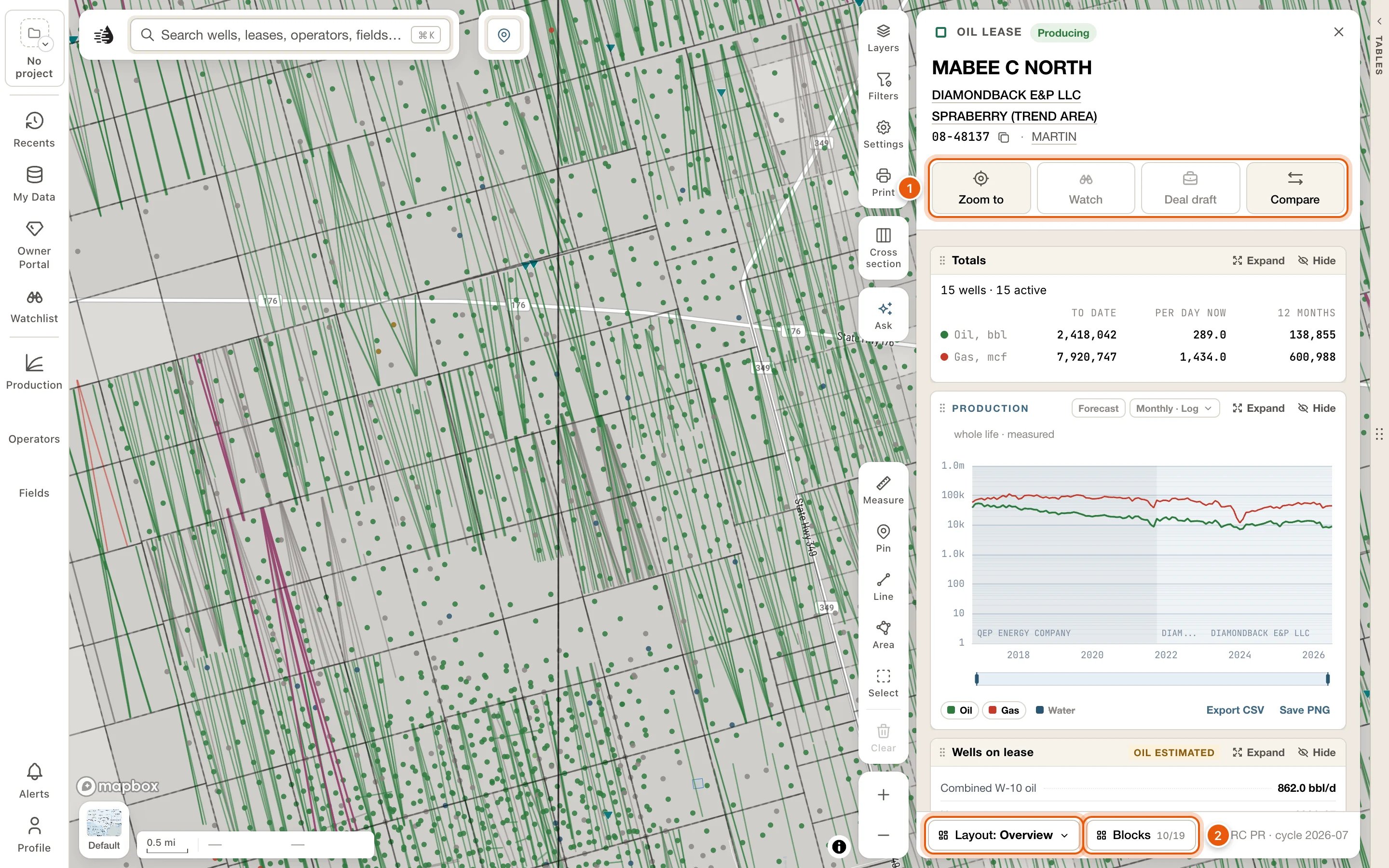
- Zoom to flies the map to the lease.
- Watch adds the lease to your project’s watchlist. Deal draft adds it to your deal draft. Both need a paid plan, and Watch needs an active project too. When one can’t be used it’s greyed out; point at it to see why.
- Compare puts the lease in the compare tray, and is pressed while it’s there.
- Totals: its bores, then oil and gas to date, per day now and over the last 12 months.
- Production: the lease’s whole life, month by month. Expand it to open the decline workbench.
- Lease record: field, county, type, footprint and the RRC’s own figures. Export, at its foot, downloads the lease’s production or its wells. See Export one lease.
- Valuation & EUR, with Full valuation for the full report: decline, cash flow and assumptions.
- Wells on lease: every bore, with its status, test and share. Click one to open its card.
- Filings & events and Operator history. Click an operator in the history to open its card.
- Production forecast.
- Mineral owners: the county appraisal roll for the lease.
- Synopsis, at the foot. See Synopsis.
Per-well oil on a lease is an estimate. The RRC reports oil by lease, so QuickScout allocates it across the lease’s wells. In Wells on lease, these figures are marked Oil estimated.
Operators
Open an operator from a well’s popup, search, the operator’s name on a well’s or lease’s card, View in the Operators panel, or the Operators table.- Zoom to flies the map to where the operator works now: its live leases.
- Show on map opens the operator’s map settings. Its switch draws the operator on the map while its card is open, and is on at first. Under it, Wells, Polygons (its leasehold) and Dim the rest of the map choose what’s drawn.
- Add layer adds the operator to your Operators layer, so it stays on the map after the card closes. It’s pressed while the operator is in the layer; click it again to take it out. See Operator and field layers.
- Show leases and Show wells list every one of the operator’s leases or wells in a tab of their own beside the card. Your own tabs and their filters stay as they are. See The Record tab.
- Compare puts the operator in the compare tray.
Fields
Open a field from a well’s popup, search, the field’s name on a well’s or lease’s card, View in the Fields panel, or the Fields table. Where a field’s outline is on the map, click it.- Zoom to flies the map to the field’s wells.
- Show on map opens the field’s map settings. Its switch draws the field while its card is open, and is on at first. Oil, Gas or boe sets what the wells are sized by and the labels say. Wells, and Polygons (the survey tracts the field sits on and, zoomed in, its leases’ outlines), each have Show and Labels.
- Add layer adds the field to your Fields layer, so it stays on the map after the card closes. It’s pressed while the field is in the layer; click it again to take it out.
- Show leases and Show wells list the field’s leases or wells in a tab of their own. See The Record tab.
- Compare puts the field in the compare tray.
Counties
Every Texas county has a card: what it produces, what’s being drilled there, and who is busy in it. To open one:- Click the place control (📍) at the top of the map, then View county. Zoom to county, beside it, fits the map to the county instead.
- Click the county on another card’s id line, such as a well’s or a lease’s, or one of the counties in a field card’s Record.
- Click the county beside the API in a well’s popup.
- Pick a county you’ve looked at in Recents.
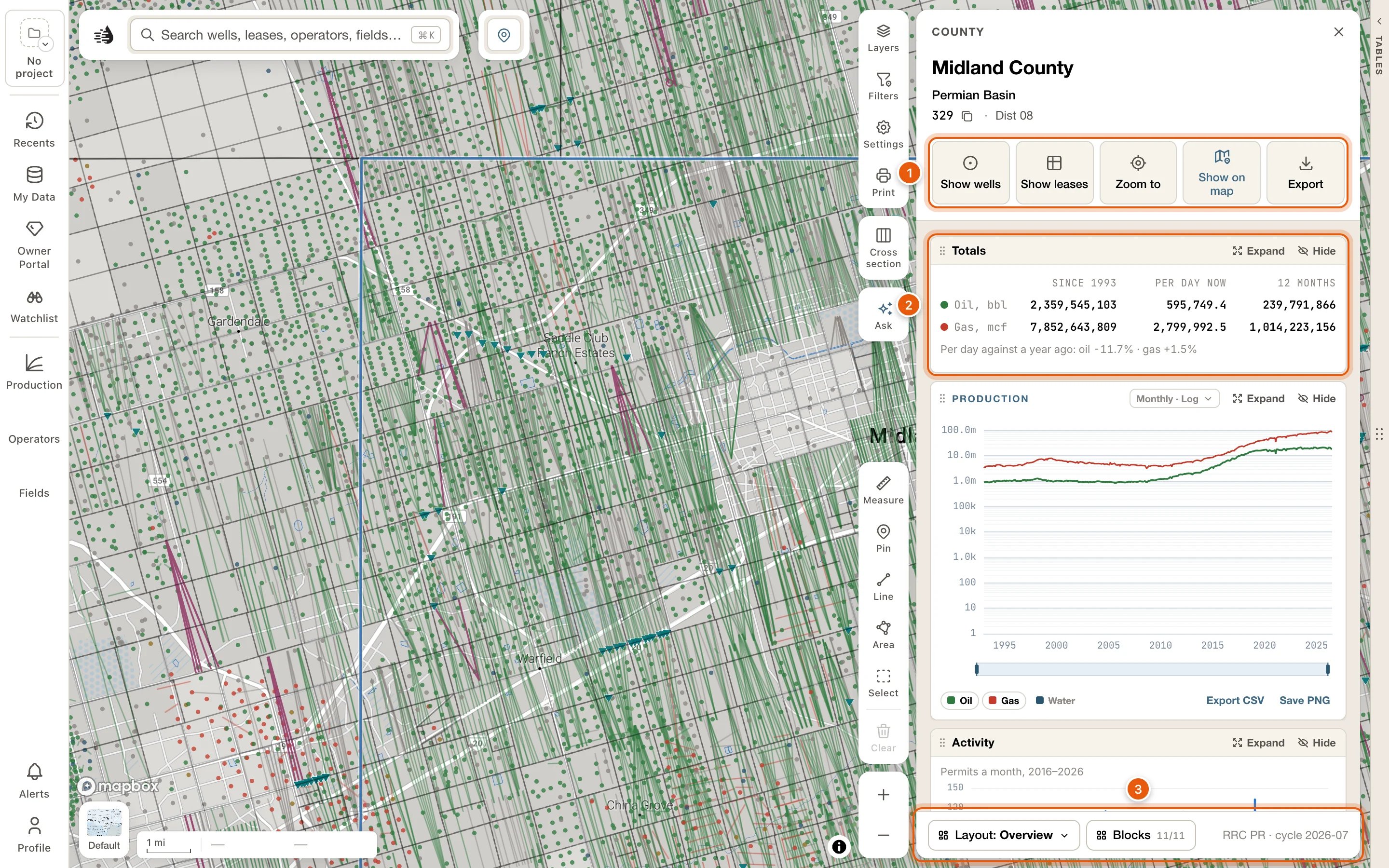
- Show wells and Show leases list every well or lease in the county in a tab of their own, the Record tab. A lease that crosses a county line is listed in each county it’s in. Your own tabs and their filters stay as they are, and the card stays open.
- Zoom to fits the map to the county.
- Show on map draws the county’s outline on the map while its card is open. It’s on at first, and your choice holds for every county.
- Export writes the county’s wells, production, land grid, leases, county line and tables as files for your own software, in one zip. See Export an area or a county.
Selected areas
Hold Shift and drag a box on the map, or use Select in the draw tools at the bottom right, and everything inside the area opens on a card of its own, Selected area. Its Table button lists the area’s rows on a Selected area tab in the data tables, and Export writes them as files, in one zip. The W-1 and completion documents of the area’s wells are in its Documents block, which you add from Blocks. See Select an area.What still opens in the drawer
A few things open in the drawer, the card that floats on the left under the search box, rather than as a record card.Injection wells
With the Injection wells layer on, click an injection well for its record: Permits, Sources, Integrity and Compliance. See Layers.Well logs
Open a well’s logs from Logs in its popup, under More, or from the Well logs block of its card. A log opens in the Log tab beside the map, or in a log drawer when it can’t be read in the app. See Well logs on the map.Heatmap cells
Click a hexagon on any heatmap to see what’s inside it: the Wells (or Leases, or injection permits) and their Aggregates. Frac Disclosures cells have Jobs, Chemistry and Aggregates. The drawers in this section need a paid plan.Land and owners
Right-click anywhere on the map to see the land at that spot. You need to be signed in. A small box opens at your pointer with:- The survey abstract (A-1234 · Midland County) and its legal description, such as Section 12, Block 34, T&P RR Co Survey, with its acres. If abstracts overlap there, it says so.
- SURFACE OWNER: the owner on the county appraisal roll, their mailing address, and the parcel’s acres, appraisal district and tax year. When parcels stack at one spot, it says how many.
- View land record opens the full land record. It needs a paid plan.
- Copy description copies the legal description.
The land record
The land record drawer has Zoom to abstract and Copy description, then:- Original Texas Land Survey: abstract, survey (the original grantee), block, section, county and mapped area.
- Surface owner at this spot: owner, care of, mailing address, legal description, property and geo IDs, appraisal district and tax year.
- Surface owners on this abstract: every owner on the abstract with their acres and share.
- Leases & mineral owners: each lease with wells on the abstract. Open lease opens its card, and Show owners lists its mineral owners with their interest type, value and decimal interest.
- Wells and Drilling permits on the abstract. Click one to open its card.
Mineral owners come from the county appraisal rolls, which list interests on producing leases only. Unleased or non-producing minerals aren’t on them. Survey lines are an approximation, not a title opinion.